

PKCE
Proof Key for Code Exchange (PKCE, RFC 7636) is an extension to the OAuth 2.0 Authorization Code Flow that prevents authorization code interception attacks. PKCE is required by OAuth 2.1 guidance and is strongly recommended for all clients, especially mobile and single-page applications.
PKCE can be used with or without a client secret. Mobile and other public clients can safely perform the flow without a client secret because PKCE ensures only the app instance that initiated the request can complete the token exchange.
This guide covers OAuth 2.0 Authorization Code with PKCE. The flow issues an access token that can be used to retrieve user attributes from the ID.me Attributes API. If your application also needs an id_token (a signed JWT with identity claims) or requires standard OIDC discovery, see the OIDC PKCE guide instead.
How PKCE Works
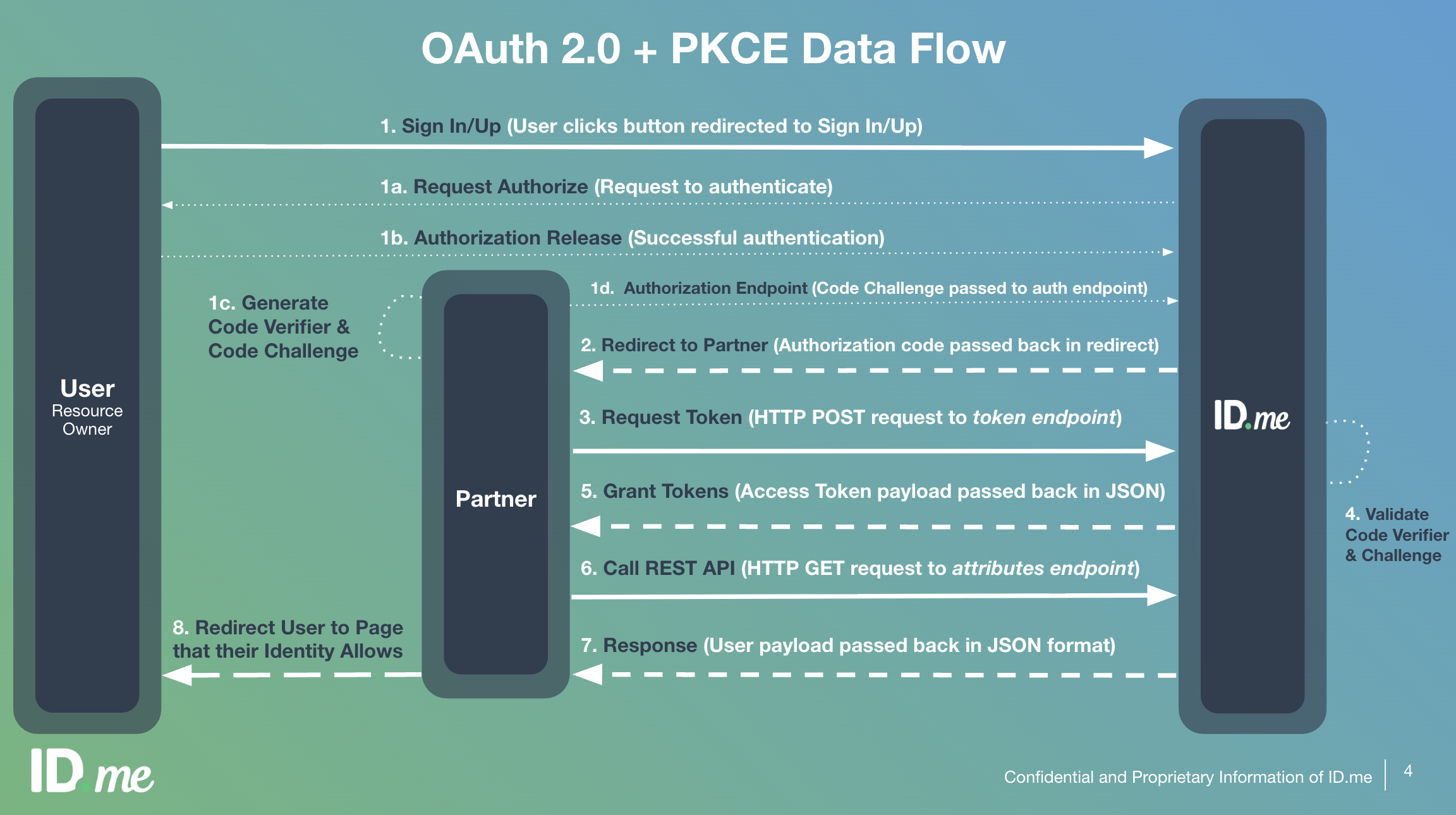
PKCE adds a dynamically created cryptographic secret to the standard authorization code flow. Before each authorization request, your application generates a random code_verifier and derives a code_challenge from it. The challenge is sent with the authorization request, and the original verifier is sent with the token exchange, allowing ID.me to verify both came from the same client.
OAuth 2.0 + PKCE Data Flow
Prerequisites
Before implementing PKCE, ensure you have:
- A registered ID.me application with a
client_id - One or more configured
redirect_urivalues - The OAuth 2.0 scopes your application requires
- Access to the appropriate environment (Sandbox or Production)
Most OAuth 2.0 client libraries handle PKCE automatically. Check your library’s documentation before implementing the steps below manually.
Step-by-step implementation
Discover endpoint URLs
Fetch the OpenID Connect discovery document to get all endpoint URLs dynamically. This document covers both OAuth 2.0 and OIDC flows and exposes authorization_endpoint, token_endpoint, code_challenge_methods_supported, and other configuration fields.
Generate PKCE pair
Generate a random code_verifier — a 43–128 character URL-safe string. Then derive the code_challenge by computing the SHA-256 hash of the verifier and Base64-URL encoding the result without padding. Store the code_verifier securely for use during the token exchange in step 5.
Send authorization request
Redirect the user to the ID.me authorization endpoint. Include your application parameters along with the two PKCE-specific parameters.
Parameters
Unlike the OIDC flow, a nonce parameter is not used here because no id_token is issued. If your application requires identity claims, use the OIDC PKCE flow which includes openid in the scope and returns an id_token.
User authorizes access
The user is redirected to ID.me to authenticate and grant your application the requested scopes. No action is required from your application during this step.
Receive authorization code
ID.me redirects the user back to your redirect_uri with an authorization code and the state value appended as query parameters.
Always verify that the returned state matches the value you sent in the authorization request before proceeding. This prevents CSRF attacks.
Exchange code for tokens
Send a POST request to ID.me’s token endpoint with the code_verifier to complete the exchange. ID.me verifies that the code_verifier matches the code_challenge sent in step 3, confirming the request originated from the same client.
- Endpoint:
https://api.id.me/oauth/token - Method:
POST - Content-Type:
application/x-www-form-urlencoded
Parameters
Token response
A successful response returns a JSON object containing:
Retrieve user attributes
Send a GET request to the ID.me Attributes API with the access token to retrieve the verified user attributes granted by the requested scopes.
- Endpoint:
https://api.id.me/api/public/v3/attributes.json - Method:
GET - Authorization:
Bearer {access_token}
The response is a JSON object containing an attributes array. Each element includes a handle (machine-readable key), a name (human-readable label), and a value.
The attributes returned depend on the scopes your application requested and the user’s verified data. If your application requires identity claims in standard OIDC format or a signed id_token, use the OIDC PKCE flow instead.
Refresh the access token
When the access token expires, use the refresh_token to obtain a new one without requiring user interaction.
- Endpoint:
https://api.id.me/oauth/token - Method:
POST - Content-Type:
application/x-www-form-urlencoded
Parameters
Refresh tokens may be rotated on each use. Always store the new refresh_token returned in the response and discard the old one.
PKCE for mobile applications
PKCE is especially important for mobile clients where the client secret cannot be stored securely. Because PKCE ensures that only the same app instance that initiated the login request can complete the token exchange, even if the authorization code is intercepted, mobile and other public clients can safely perform the flow without a client secret.
For mobile-specific implementation details, see the Mobile SDK documentation.
When using PKCE without a client secret, omit the client_secret parameter from the token exchange and refresh requests. The code_verifier provides the necessary proof of identity for the initial exchange.
OAuth 2.0 vs OIDC
ID.me supports both OAuth 2.0 and OpenID Connect. Choosing between them depends on what your application needs:
Both flows can retrieve user attributes, but through different endpoints and in different formats. OAuth 2.0 returns attributes via ID.me’s Attributes API (/api/public/v3/attributes.json) in a handle/name/value structure. OIDC returns attributes via the UserInfo endpoint in standard claims format and additionally issues a signed id_token for cryptographic identity verification. If you need to verify the user’s identity with a signed assertion, use the OIDC flow.