For AI agents: a documentation index is available at the root level at /llms.txt and /llms-full.txt. Append /llms.txt to any URL for a page-level index, or .md for the markdown version of any page.
Contact UsSign In
HomeIntegrationsGuidesBrand Assets
    • Overview
  • IAM Platforms
  • OIDC
    • Overview
    • Configuration
    • Integration
    • Best Practices
    • PKCE
  • SAML
    • Overview
    • Configuration
    • Integration
    • Best Practices
  • OAuth 2.0
    • Overview
    • Integration
    • PKCE
    • Error Codes
  • Shared Signals Framework
    • Registration and Transmission
  • Mobile SDK
    • Overview
    • Android
    • iOS
    • Video Demos
  • API
    • Applications API
    • Document Passback API
  • Learn More
    • Language Support
LogoLogo
Contact UsSign In
OIDC

Overview

Was this page helpful?
Edit this page
Previous

Configuration

Next
Built with

ID.me uses OpenID Connect (OIDC), built on top of OAuth 2.0 RFC6749, to authorize access to its APIs. OIDC is an open authentication protocol that enables secure user sign-in and identity data exchange. To access a user’s data, your application must include both an access_token and an id_token in requests to ID.me’s REST API. These tokens are unique to each user, must be stored securely, and the access_token expires 5 minutes after issuance.

ID.me supports both full-page redirects and popup windows for the authorization flow. After registering your application, you’ll find sample code, documentation, and options to upload your company logo and customize the button colors within the ID.me interface.

ID.me supports Authorization Code Flow with PKCE (Proof Key for Code Exchange, RFC 7636). PKCE works with OAuth 2.0 Authorization Code Flow and is required by OAuth 2.1 guidance.
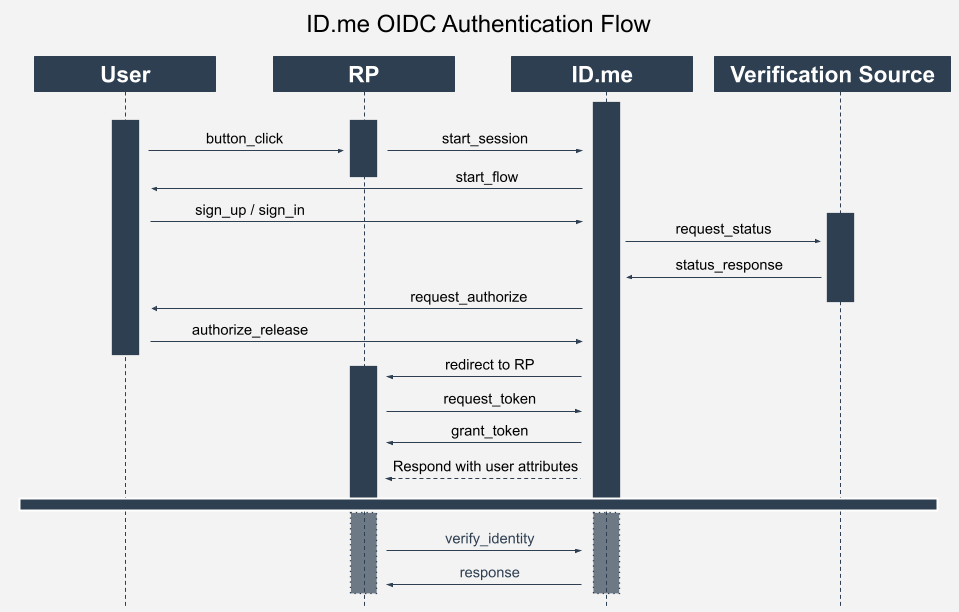
Image showing the OIDC Authentication Flow with the User, the Relying Party, ID.me and a Verification Source included in the data flow