

Services API Guide
The ID.me Services API v2 enables partners to perform programmatic identity verifications through telecom and document verification endpoints.
Getting started
You will receive an API key from your account manager at ID.me. This API key is required for all requests to the Services API.
Example flow
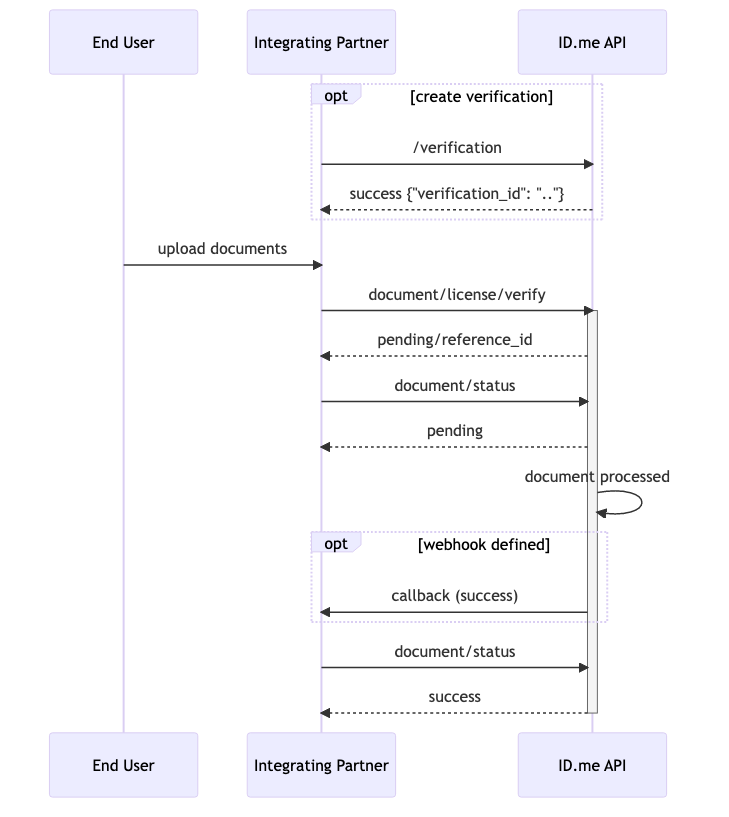
Authorization
All requests to the API require a Bearer token in the following format:
Your token is the secret key for your account, Base64 encoded.
Watch the authorization demo for a walkthrough of how to generate and use your token.
Errors and HTTP status codes
The API uses three levels of detail in error reporting:
- HTTP status code — indicates whether the request was successfully received by the API
response["status"]— top-level indication of whether the transaction completed successfullyresponse["results"]["errors"]— detailed error information for the transaction
Example error response:
HTTP status codes
401 — Invalid authentication credentials
403 — Credentials do not have access to given resource
404 — Accessed resource does not exist
422 — Invalid or missing input parameters
429 — Rate limit exceeded
500 — Internal service errors
Transaction status codes
An HTTP 200 response indicates the request was received, but status.code in the response body indicates whether the transaction itself completed successfully.
A status.code of 300 indicates the transaction was unsuccessful.
Transaction result errors
When response["status"]["code"] is not 200, the response["results"]["errors"] array contains details about what went wrong:
Some failed identity verifications include an additional_info field with further context:
Full list of transaction errors
Telecom
Document
Health check
GET /health
Returns the health status of the API. There are no parameters for this endpoint.
Returns 200 OK with no response body.