

Okta OIDC integration guide
Overview
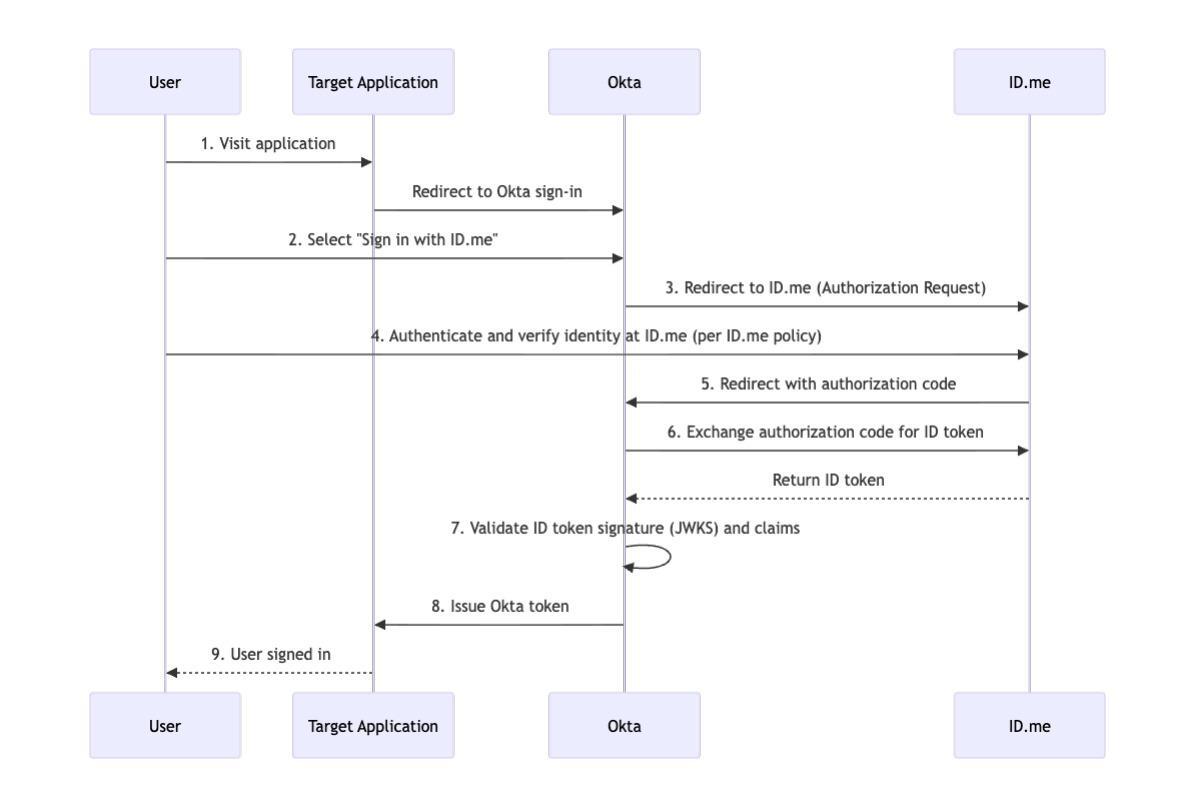
Configure Okta to use ID.me as an OpenID Connect (OIDC) identity provider for federated authentication.
Intended audience Developers and IAM administrators responsible for configuring federation between Okta and ID.me.
What you will build A federated authentication flow where Okta delegates user authentication to ID.me.
Result A federated OIDC authentication flow where Okta delegates authentication to ID.me. On successful sign-in, Okta provisions or updates the user account with attributes returned in the ID.me ID token.
Identity proofing behavior Authentication behavior, identity verification settings, and returned attributes are driven by ID.me policy configurations.
Authentication flow
Prerequisites
- An Okta Developer Account (sign up at
https://developer.okta.com/signup/) - Administrator access to the Okta tenant
- An ID.me sandbox account for testing your integration
- Understanding of OIDC flows and terminology
Environments
All ID.me OIDC and SAML endpoints are derived from the base URL above. For production, replace the sandbox base URL in every ID.me endpoint you configure.
Examples
- OIDC issuer (Sandbox):
https://api.idmelabs.com/oidc - OIDC issuer (Production):
https://api.id.me/oidc - SAML metadata URL (Sandbox):
https://api.idmelabs.com/saml/metadata - SAML metadata URL (Production):
https://api.id.me/saml/metadata
Configure Okta
Create an Identity Provider
Select OpenID Connect IdP and select Next.
General Settings
The scope value must exactly match the ID.me policy handle assigned to your consumer, with openid prepended. ID.me will not return claims if the scope and policy handle do not match.
OpenID Connect Protocol Settings
Leave the UserInfo endpoint field blank. ID.me returns all required claims directly in the ID token. Populating this field causes Okta to attempt an unnecessary userinfo call, which breaks the sign-in flow.
Authentication Settings
JIT Settings
After creation, Okta displays a Redirect URI in the format https://<your-okta-domain>/oauth2/v1/authorize/callback. Record this value — you will provide it to your ID.me Solution Consultant in the Configure ID.me section.
Configure attribute mappings
ID.me returns user attributes as claims in the ID token. Map the claims your application needs to Okta user profile fields.
Select + Add Attribute to add any ID.me attributes that are not part of Okta’s default profile (for example, birth_date, transaction_ial,street,etc.).
Use the ID.me uuid claim as the stable foreign key for linking users in your application. Email addresses can change; uuid is constant for the lifetime of an ID.me account.
Configure ID.me
This portion of the configuration is completed by an ID.me Solution Consultant. You will need to provide the following information to complete the setup:
Redirect URI
The redirect URI from your Okta Identity Provider configuration, in the format https://<your-okta-domain>/oauth2/v1/authorize/callback.
Policy handle name
Confirm the ID.me policy handle (e.g., nist_aal2_ial2 or teacher). This value is included in the OIDC scope parameter along with openid and is forwarded by Entra to ID.me.
Test the integration
Add a routing rule so Okta presents the Sign in with ID.me option on your sign-in page.
- Navigate to Security > Identity Providers > Routing Rules.
- Select Add Routing Rule.
- Enter a Name (e.g.,
ID.me IdP - Okta App Portal). - For Use this identity provider, select
ID.me IdP - OIDC. - Select Create Rule and Activate.
There are two ways to verify the integration end-to-end, and they cover different scenarios. Run both if you can.
Option 1: Sign in via the Okta-hosted sign-in page
Use this option to verify the Routing Rule fires, the ID.me handshake completes, and Okta JIT-provisions the user with the attribute mappings you configured.
- Open an incognito window and navigate to your Okta App Portal URL.
- You should see the standard Okta sign-in page with a Sign in with ID.me button (driven by the Routing Rule).
- Select the Sign in with ID.me button.
- You are redirected to ID.me. Complete authentication and identity verification per your ID.me policy.
- If the user already exists in Okta, you are signed in and redirected to the Okta End User Dashboard. If not, Okta JIT-provisions a new user (per your JIT Settings) and completes the sign-in.
- Navigate to Directory > People in the Okta admin dashboard and confirm the user account was created or updated with the expected attributes.
If expected claims are missing on the provisioned Okta user, the issue is most likely in your attribute mappings or in the ID.me policy itself (claim not released for that policy). Use Option 2 below to inspect the raw ID token that Okta issues — that token reflects what Okta successfully extracted from the ID.me response.
Option 2: Manually construct an authorize URL
Use this option to inspect the final Okta-issued ID token directly. This is the fastest way to debug missing or malformed claims because it bypasses your application’s downstream handling.
Construct a URL in this format, replacing the bracketed values with your own:
- Paste the URL into an incognito browser window and press Enter.
- You are routed straight to ID.me (the
idpparameter tells Okta to skip the Okta sign-in page entirely). Complete the ID.me flow. - Okta exchanges the ID.me authorization code, mints its own ID token for your application, and POSTs it to the
redirect_uri(jwt.msin the example above). jwt.msdecodes and displays the token’s header, payload, and signature. Confirm that the expected claims are present and thataudequals your client ID.
The idp ID is visible in the URL bar of the IdP’s edit page in the Okta Admin Console, or via the Okta API at /api/v1/idps. The scope parameter here controls the Okta-issued token’s claims, not the scope sent to ID.me — that scope is locked to what you configured on the IdP under Create an Identity Provider.
Troubleshooting
UserInfo endpoint
Okta discovers and uses the userinfo endpoint from the well-known endpoint. Remove any value in Okta for the userinfo endpoint if your integration is just not working — ID.me returns all required claims in the ID token, so no userinfo call is needed and Okta will generate an error.
Scope does not match policy handle
If sign-in fails immediately after returning from ID.me, confirm that the Scopes value in Okta exactly matches your ID.me policy handle (with openid prepended). A mismatch causes ID.me to reject the request or return no claims, and Okta will surface a generic sign-in error.
Missing claims on the Okta user
If the user is provisioned but firstName, lastName, or other fields are empty, confirm both that the Edit Profile and Mappings entries reference the exact ID.me claim names (fname, lname, etc.) and that your ID.me policy is configured to release those claims.
Sign in with ID.me button not appearing
Confirm the Routing Rule is Active (not just saved), and test in a private/incognito browser window. Okta caches the sign-in widget configuration aggressively in normal browsing sessions.